
ในสำนักงาน หาก Computer เครื่องหนึ่งติด Malware ผลกระทบอาจเป็น
- เปิดไฟล์ไม่ได้
- Email ใช้งานไม่ได้
- ERP เข้าไม่ได้
- ต้อง Restore เครื่องใหม่
แต่ในโรงงาน ถ้า Cyberattack กระทบระบบควบคุมการผลิต ผลลัพธ์อาจมากกว่าเรื่อง “ข้อมูล”
เพราะระบบเหล่านั้นอาจควบคุม
- Conveyor
- Pump
- Motor
- Boiler
- Chiller
- Robot
- Production Line
- Temperature
- Pressure
- Valve
- Safety Interlock
ดังนั้นเมื่อพูดถึง Cybersecurity ในโรงงาน เราไม่ได้ปกป้องเพียง Computer
แต่กำลังปกป้อง
กระบวนการที่ส่งผลต่อโลกจริง
แนวคิดนี้เรียกว่า OT Security
OT Security คืออะไร?
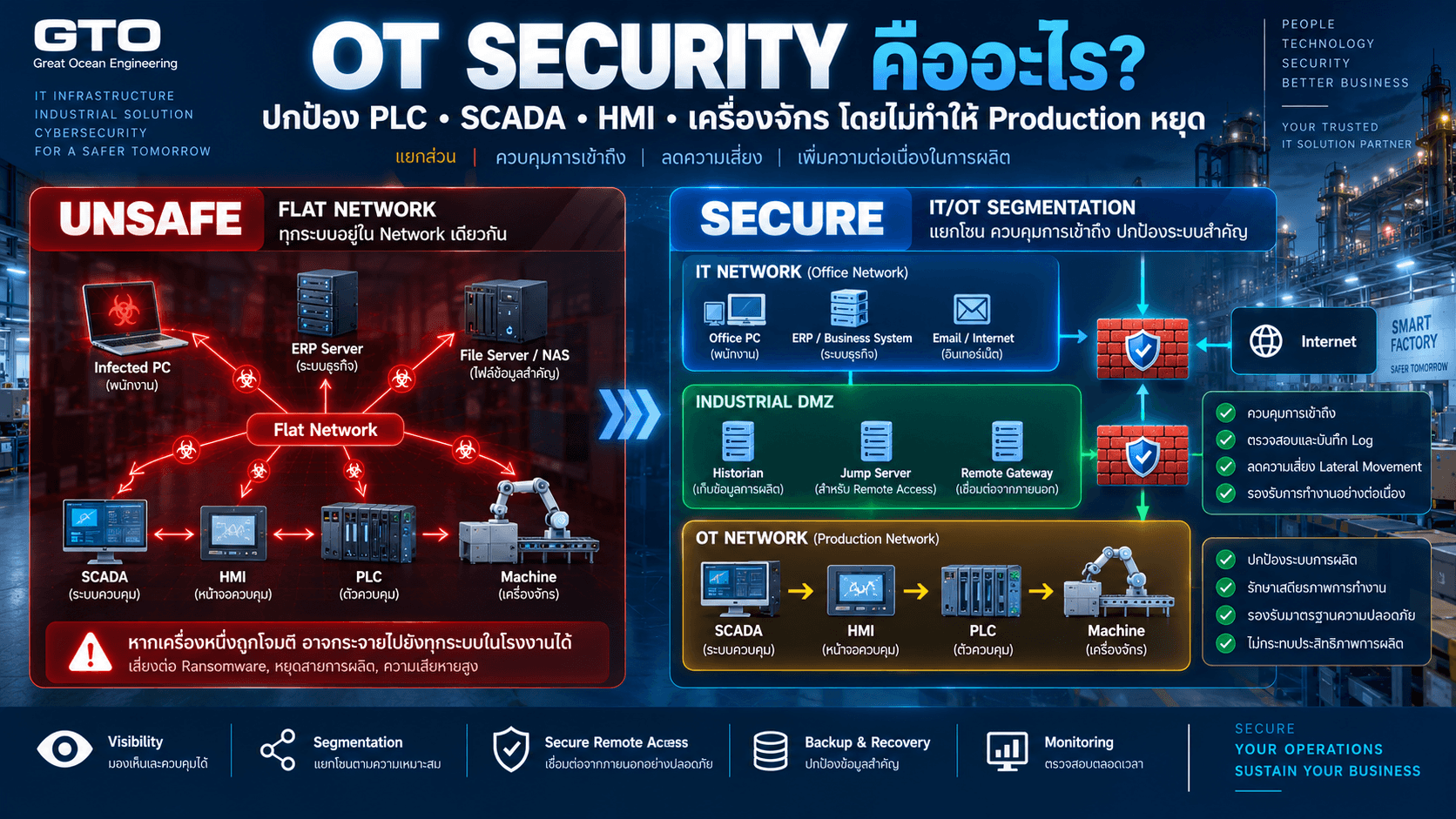
OT Security หรือ Operational Technology Security คือการปกป้องระบบ อุปกรณ์ Network และ Software ที่ใช้ตรวจสอบหรือควบคุมกระบวนการทางกายภาพ
ตัวอย่างระบบ OT ได้แก่
- PLC
- SCADA
- HMI
- DCS
- RTU
- Industrial PC
- Sensor
- Actuator
- Robot
- Building Automation
- Manufacturing Equipment
NIST อธิบาย OT ว่าเป็นระบบและอุปกรณ์ที่ตรวจจับหรือก่อให้เกิดการเปลี่ยนแปลงโดยตรงต่อ Physical Environment ผ่านการ Monitoring หรือ Control เช่น Industrial Control Systems และ Building Automation Systems
IT กับ OT ต่างกันอย่างไร?
IT — Information Technology
มุ่งเน้น
- Data
- Application
- ERP
- File Server
- Database
- User Device
หากระบบเสีย
ผลกระทบหลักคือข้อมูลหรือการทำงานของพนักงาน
OT — Operational Technology
มุ่งเน้น
- Machine
- Production
- Process
- Sensor
- PLC
- Control System
- Physical Operation
หากระบบเสีย
อาจเกิด
- Production Stop
- Machine Damage
- Product Quality Issue
- Safety Incident
นี่ทำให้ Security Priority ของ OT แตกต่างจาก IT
ทำไมเอา IT Security ไปใช้กับ OT ตรง ๆ ไม่ได้?
ใน IT เราอาจตัดสินใจว่า
“เครื่องนี้ติด Malware → Disconnect ทันที”
แต่ถ้า Device นั้นเป็น PLC ที่กำลังควบคุม Production Line
การ Disconnect อัตโนมัติอาจทำให้เครื่องจักรหยุดผิดลำดับ
หรือสร้าง Safety Risk
NIST จึงเน้นว่า OT Security ต้องคำนึงถึง Performance, Reliability และ Safety Requirements ของระบบควบคู่กับ Cybersecurity
Security Priority ของ IT กับ OT ต่างกันอย่างไร?
ใน IT มักพูดถึง
CIA Triad
- Confidentiality
- Integrity
- Availability
แต่ใน OT
Availability และ Safety
มักมีความสำคัญสูงมาก
เพราะระบบต้องควบคุม Production ต่อเนื่อง
ตัวอย่าง
ERP ล่ม 30 นาที
อาจทำให้พนักงานทำงานช้าลง
แต่
PLC Network ล่ม 30 นาที
อาจทำให้ Production Line หยุดทั้งหมด
ระบบ OT มีอะไรบ้าง?
PLC
Programmable Logic Controller
ใช้ควบคุม Logic ของเครื่องจักร
HMI
Human Machine Interface
หน้าจอที่ Operator ใช้ดูและควบคุมเครื่องจักร
SCADA
Supervisory Control and Data Acquisition
ใช้ Monitor และ Control Process ในระดับระบบ
DCS
Distributed Control System
ใช้ควบคุมกระบวนการผลิตที่ซับซ้อน
Industrial PC
Computer ที่ใช้กับ Machine หรือ Production Process
Sensor / Actuator
Sensor วัดค่าต่าง ๆ
Actuator ทำให้เกิด Action จริง
เช่นเปิด Valve หรือขับ Motor
OT Network เคยถูกออกแบบมาเพื่อ Security หรือไม่?
ระบบ OT จำนวนมากถูกออกแบบในยุคที่
- Network แยกออกจาก Internet
- Protocol เชื่อถือ Device ภายใน
- Cyberattack ยังไม่ใช่ Requirement หลัก
- Machine ใช้งานหลายสิบปี
ดังนั้น Protocol บางชนิดอาจไม่มี
- Encryption
- Strong Authentication
- Modern Access Control
และ Device บางตัวอาจไม่สามารถ Update ได้ง่าย
นี่คือเหตุผลที่ Architecture มีความสำคัญมากใน OT Security
ทำไม OT เริ่มเชื่อมกับ IT มากขึ้น?
โรงงานสมัยใหม่ต้องการข้อมูล Production มาใช้กับ
- ERP
- MES
- Dashboard
- Analytics
- Maintenance
- Quality
- Cloud
- AI
- Remote Support
ดังนั้น OT ที่เคยแยกตัวออกมาเริ่มเชื่อมกับ IT มากขึ้น
ประโยชน์เพิ่มขึ้น
แต่ Attack Surface ก็เพิ่มขึ้นตาม
Cyberattack เข้า OT ได้จากไหน?
ช่องทางไม่ได้มีแค่ Internet
อาจมาจาก
- Office Computer
- Vendor Laptop
- Remote Access
- USB Drive
- VPN
- Engineering Workstation
- Misconfigured Firewall
- Shared Password
- Unpatched Windows
- Compromised Account
- Cloud Connection
ดังนั้นการบอกว่า
“PLC ไม่ต่อ Internet จึงปลอดภัย”
อาจไม่เพียงพอ
เพราะ Attack Path อาจผ่าน Device อื่น
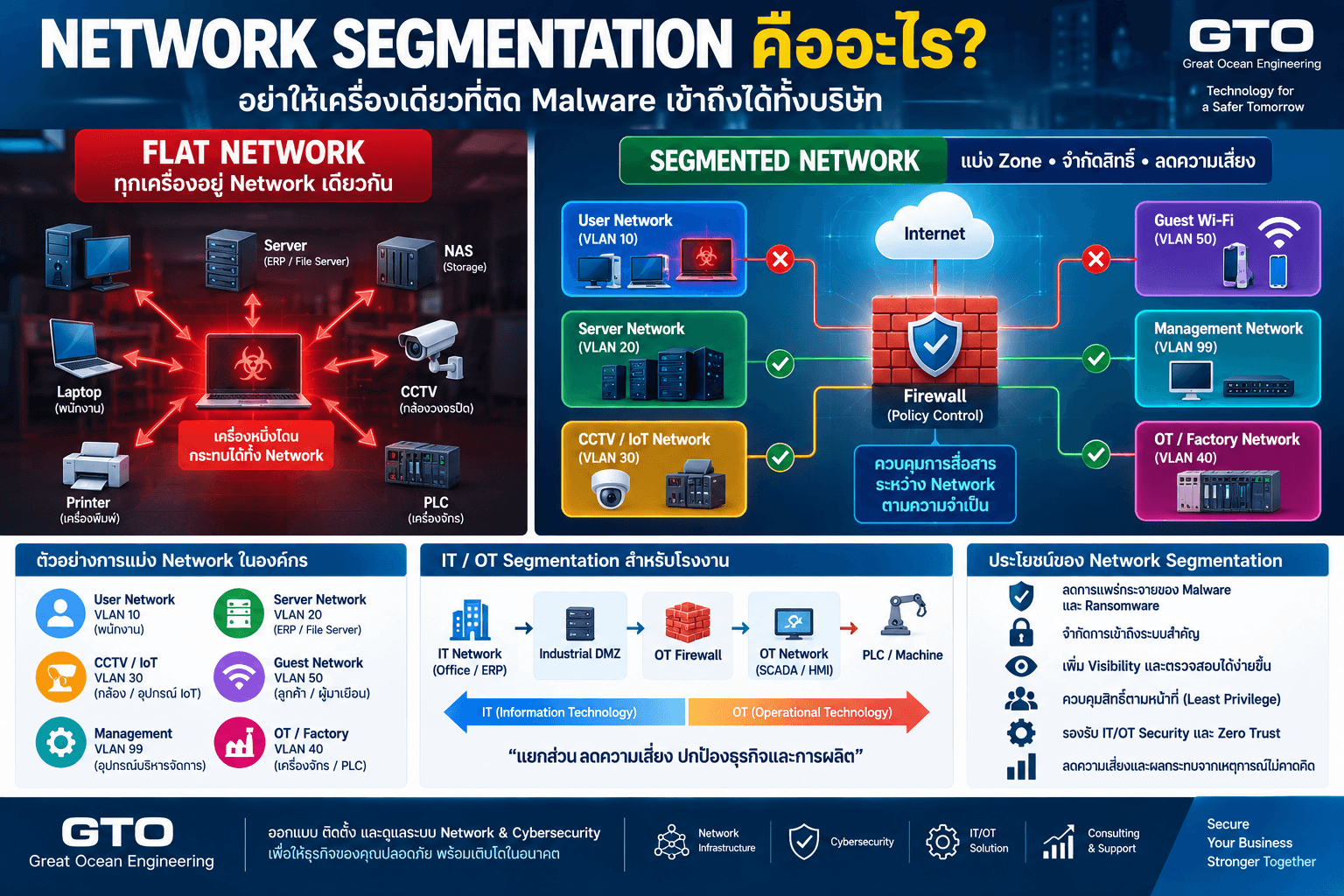
IT กับ OT ควรแยก Network หรือไม่?
ควร
NIST แนะนำให้ Characterize, Segment และ Isolate IT กับ OT Device ตามปัจจัย เช่น Trust Level, Criticality และ Data Flow ส่วน CISA ระบุว่าการสร้าง Boundary ระหว่าง IT และ OT ช่วยลดความเสี่ยงจากภัยที่เริ่มจาก IT และจำกัดการเคลื่อนที่ไปยัง OT ได้
โครงสร้างพื้นฐานอาจเป็น
Internet
↓
Corporate Firewall
↓
IT Network
↓
Industrial DMZ
↓
OT Firewall
↓
SCADA / HMI
↓
PLC / Machine
Flat IT/OT Network มีความเสี่ยงอย่างไร?
ลองนึกภาพ
Office Laptop
PLC
ERP Server
HMI
Printer
CCTV
อยู่ Network เดียวกันทั้งหมด
ถ้า Office PC ถูกโจมตี
Attacker อาจสามารถ Scan ไปยัง OT Device ได้ง่าย
CISA ระบุว่า Network ที่ IT และ OT ไม่ได้ถูก Segmentation จะเพิ่มความเสี่ยงต่อ Lateral Movement และทำให้การตรวจจับผู้โจมตียากขึ้น
Industrial DMZ คืออะไร?
Industrial DMZ หรือ IDMZ คือ Network กลางที่คั่นระหว่าง IT และ OT
แทนที่จะให้
IT → OT
คุยกันโดยตรง
สามารถให้ Service ที่ต้องแลกข้อมูลอยู่ใน DMZ
ตัวอย่าง
- Historian Replica
- Jump Server
- Patch Repository
- File Transfer Server
- Remote Access Gateway
NIST แนะนำว่าหาก Corporate Network จำเป็นต้องเชื่อมกับ ICS/OT ควรลดจำนวน Connection ให้เหลือน้อยที่สุด และใช้ Firewall กับ DMZ ป้องกัน Boundary ระหว่างสองฝั่ง
Firewall สำหรับ OT สำคัญอย่างไร?
Firewall ทำหน้าที่ควบคุมว่า Traffic แบบใดสามารถข้าม Security Zone ได้
ตัวอย่าง
ERP → OT
ไม่จำเป็นต้องเข้า PLC โดยตรง
Historian → IT
Allow เฉพาะ Port ที่ต้องใช้
Engineering PC → PLC
Allow เฉพาะ Engineering Station ที่ได้รับอนุญาต
User VLAN → PLC
Deny
หลักคือ
Allow เฉพาะ Communication ที่จำเป็น
VLAN อย่างเดียวพอหรือไม่?
ไม่พอ
VLAN ช่วยแยก Network ใน Layer 2
แต่ถ้า Inter-VLAN Routing เปิด
ANY → ANY
ทุก VLAN ก็ยังติดต่อกันได้
ดังนั้น OT Segmentation ต้องมี
VLAN + Firewall / ACL + Policy
ทำงานร่วมกัน
Purdue Model คืออะไร?
Purdue Model เป็น Architecture Model ที่ใช้ช่วยจัดระดับระบบ Industrial Environment
ตัวอย่างแบบย่อ
Level 5
Enterprise / Internet
Level 4
Business Systems
ERP / Email
Level 3.5
Industrial DMZ
Level 3
Site Operations
Historian / MES / Engineering
Level 2
Supervisory Control
SCADA / HMI
Level 1
Basic Control
PLC / Controller
Level 0
Physical Process
Sensor / Actuator
NIST ระบุว่าองค์กรสามารถใช้ Model ที่เป็นที่ยอมรับ เช่น Purdue Model หรือ ISA-95 ในการช่วยวาง OT Network Segmentation ได้
ต้องทำ Purdue Model ทุกโรงงานหรือไม่?
ไม่จำเป็นต้องใช้เหมือนกันทั้งหมด
Purdue Model เป็น Framework สำหรับช่วยคิด Architecture
โรงงานขนาดเล็กอาจไม่มีระบบครบทุก Level
สิ่งสำคัญคือรู้ว่า
- อะไรคือ Business System
- อะไรคือ OT
- อะไรคือ Critical Control
- Data ต้องวิ่งข้าม Zone อย่างไร
PLC ควรออก Internet ได้หรือไม่?
โดยทั่วไป PLC ไม่ควรมี Internet Access แบบเปิดทั้งหมดหากไม่มี Requirement ชัดเจน
ถ้าจำเป็นต้อง Update หรือ Remote Service
ควรออกแบบ Controlled Path
แทนการให้ PLC
→ Internet ANY
เพราะ PLC มีหน้าที่ควบคุม Process ไม่ใช่ Browse Internet
HMI ควรเข้า Internet ได้หรือไม่?
HMI จำนวนมากใช้ Windows
ซึ่งทำให้คนอาจคิดว่าเป็น PC ปกติ
แต่ HMI มีหน้าที่ควบคุม Process
ดังนั้น Internet Access ควรถูกจำกัดตาม Requirement จริง
ไม่ควรให้ Operator ใช้
- Web Browsing
- Social Media
บน HMI หากไม่จำเป็น
เพราะเพิ่ม Attack Surface
Engineering Workstation สำคัญแค่ไหน?
สำคัญมาก
Engineering Workstation อาจมี Software สำหรับ
- PLC Programming
- Firmware
- Configuration
- Project File
- Machine Setting
และมีสิทธิ์แก้ Logic ของ Control System
ดังนั้นควรมี Security สูงกว่าคอมพิวเตอร์สำนักงานทั่วไป
Vendor Laptop เป็นความเสี่ยงหรือไม่?
เป็นหนึ่งในจุดที่ต้องควบคุม
Vendor อาจนำ Laptop มาจาก
- โรงงานอื่น
- Site อื่น
- Network ที่เราไม่ควบคุม
แล้วเชื่อมเข้าสู่ OT
ไม่ควรให้ Vendor Laptop ต่อเข้า OT VLAN โดยตรงโดยไม่มี Policy
Remote Access เข้า OT ควรทำอย่างไร?
ไม่ควรเปิด
- RDP
- VNC
- SSH
- PLC Programming Port
จาก Internet เข้าเครื่องจักรโดยตรง
Architecture ที่เหมาะสมกว่าอาจเป็น
Vendor
↓
VPN + MFA
↓
Remote Access Gateway
↓
Jump Server
↓
Approved OT Device
พร้อม
- Logging
- Session Control
- Time-limited Access
Jump Server คืออะไร?
Jump Server เป็นเครื่องกลางสำหรับเข้าถึงระบบสำคัญ
แทนการให้ User หรือ Vendor เชื่อมตรงจาก Laptop ไป PLC
ข้อดีคือช่วย
- จำกัด Source
- Logging
- Monitoring
- Access Control
- Session Recording ตามระบบที่ใช้
Shared Password ใน OT มีปัญหาอย่างไร?
โรงงานบางแห่งใช้ Password เดียวกันหลายปี
เช่น
Admin / admin
หรือ Technician ทุกคนใช้ Account เดียว
เมื่อพนักงานลาออกหรือ Vendor เปลี่ยน
ก็ยังรู้ Password เดิม
ควรมี
- Unique Account
- Role
- Credential Management
- Password Rotation
- MFA ในจุดที่รองรับ
MFA ใช้กับ PLC ได้หรือไม่?
ไม่ใช่ PLC ทุกตัวจะรองรับ MFA
ดังนั้น MFA มักถูกวางในจุด Access ก่อนถึง PLC เช่น
- VPN
- Jump Server
- Remote Access Portal
- Engineering Access
นี่เป็นแนวคิด Defense in Depth
Patch PLC และ HMI เหมือน Computer ปกติได้หรือไม่?
ไม่ควร Patch แบบอัตโนมัติโดยไม่ทดสอบ
ใน IT เราอาจใช้ Automatic Update
แต่ใน OT
Patch อาจกระทบ
- Driver
- Application Compatibility
- PLC Communication
- Vendor Support
จึงควรมี
Test → Approval → Maintenance Window → Backup → Patch
แทนการ Update ทันที
Legacy Windows ในโรงงานทำอย่างไร?
OT บางระบบอาจยังใช้
- Windows 7
- Windows XP
- OS เก่า
เพราะ Machine Vendor ไม่รองรับ Version ใหม่
หาก Upgrade ไม่ได้ทันที
ควรเพิ่ม Compensating Controls เช่น
- Isolation
- Firewall
- Application Whitelisting
- Restricted Internet
- Monitoring
- Limited Access
แทนการปล่อยไว้ใน Flat Network
Antivirus / EDR ลง OT ได้หรือไม่?
บาง Device ลงได้
บาง Device ไม่ควรลง
ต้องดู Vendor Compatibility
ตัวอย่าง
Industrial Windows PC อาจลง EDR ได้
แต่ PLC ไม่สามารถลง Agent แบบเดียวกับ PC ได้
ดังนั้น OT Security ต้องมีหลาย Layer
Application Whitelisting คืออะไร?
แทนที่จะถามว่า
“Program ไหนเป็น Malware?”
Whitelisting ใช้แนวคิด
“อนุญาตเฉพาะ Program ที่ควรรัน”
เหมาะกับ OT Device บางประเภทที่ Application ไม่เปลี่ยนบ่อย
เช่น HMI ที่ใช้งาน Software ชุดเดิมทุกวัน
USB เป็นความเสี่ยงใน OT อย่างไร?
USB มักถูกใช้
- Transfer Program
- Update Firmware
- Export Report
- Backup Project
แต่ก็สามารถนำ Malware เข้า Network ที่แยกจาก Internet ได้
ควรมี Policy เช่น
- Approved USB
- Scan Station
- Device Control
- Logging
- Disable USB ที่ไม่จำเป็น
OT Asset Inventory สำคัญอย่างไร?
ก่อนป้องกัน ต้องรู้ก่อนว่ามีอะไร
Inventory ควรมี
- Device Name
- IP
- MAC
- Vendor
- Model
- Firmware
- Function
- Location
- Owner
- Criticality
- Communication Flow
ถ้ายังไม่รู้ว่ามี PLC กี่ตัว
การทำ Security Policy จะยากมาก
Passive Discovery เหมาะกับ OT อย่างไร?
ใน IT เราอาจใช้ Active Scan ได้ง่าย
แต่ใน OT Device รุ่นเก่าอาจตอบสนองต่อ Scan ที่ผิดปกติไม่ดี
จึงมักใช้ Passive Monitoring เพื่อเรียนรู้ Traffic โดยไม่ส่ง Request เข้า Device จำนวนมาก
OT Network Monitoring ควรดูอะไร?
ควรดูพฤติกรรม เช่น
- PLC คุยกับใคร
- Protocol อะไร
- มี Device ใหม่หรือไม่
- Engineering Command เกิดเมื่อไร
- มี Traffic จาก IT ไป OT ผิดปกติหรือไม่
- Device ออก Internet หรือไม่
OT มีข้อดีอย่างหนึ่งคือ Traffic Pattern มักค่อนข้างคงที่
จึงสามารถหา Anomaly ได้ดีหากมี Baseline
Logging สำคัญอย่างไร?
เมื่อเกิด Incident ต้องตอบได้ว่า
- ใคร Remote เข้า
- เวลาไหน
- จาก IP ใด
- Firewall Allow อะไร
- Configuration ถูกเปลี่ยนเมื่อไร
- PLC Program ถูกแก้โดยใคร
ถ้าไม่มี Log
Incident Investigation จะยากมาก
Backup PLC ต้อง Backup อะไร?
อย่างน้อยควรพิจารณา
- PLC Program
- HMI Project
- SCADA Configuration
- Recipe
- Drive Parameter
- Robot Program
- Network Config
- Firmware Information
- License
- Engineering File
เพราะถ้า Hardware เสีย
มีเครื่องใหม่แต่ไม่มี Program ล่าสุด
Production ก็ยังกลับมาไม่ได้
Backup PLC ควรทำเมื่อไร?
ควร Backup
- หลัง Commissioning
- หลัง Approved Change
- ก่อน Upgrade
- ก่อน Major Maintenance
- ตาม Schedule
และควรมี Version Control
ไม่ใช่ File ชื่อ
PLC_Final_Final_New2.zip
หลายสิบไฟล์โดยไม่รู้ว่าอันไหนล่าสุด
Backup Server อย่างเดียวพอหรือไม่?
ไม่พอ
OT Recovery ต้องคิดทั้ง
Server + Controller + Configuration
ตัวอย่าง
SCADA Server Restore ได้
แต่ PLC Program สูญหาย
ระบบก็ยังไม่สมบูรณ์
Offline Backup สำคัญกับ OT หรือไม่?
สำคัญ
โดยเฉพาะ Configuration ที่ Critical
ควรมี Copy ที่แยกออกจาก Production Environment
เพราะ Ransomware อาจโจมตี File Server และ Online Backup พร้อมกันได้
RPO/RTO ใช้กับ OT ได้หรือไม่?
ใช้ได้และควรใช้
แต่ต้องกำหนดจาก Production Impact
ตัวอย่าง
ERP
RTO 4 ชั่วโมง
SCADA
RTO 30 นาที
PLC Program Backup
RPO หลังทุก Approved Change
ไม่จำเป็นต้องใช้ Requirement เท่ากัน
OT Incident Response ต่างจาก IT อย่างไร?
ใน IT หากพบ Compromised Device อาจ
Isolate Immediately
แต่ใน OT ต้องถามก่อนว่า
หากตัด Device นี้ออก Production จะเกิดอะไร?
Response อาจต้องประสาน
- IT
- OT
- Production
- Engineering
- Safety
ร่วมกัน
ห้าม Shutdown PLC ทันทีทุกเหตุการณ์
นี่เป็นตัวอย่างว่าทำไม OT Incident Response ต้องมี Runbook
การ Shutdown อุปกรณ์ควบคุมโดยไม่เข้าใจกระบวนการอาจสร้างความเสียหายมากกว่าการโจมตี
Security Team ต้องทำงานร่วมกับ Process Owner
OT Security กับ Safety เกี่ยวข้องกันอย่างไร?
OT ทำงานกับ Physical Process
ดังนั้น Security Incident อาจเปลี่ยน
- Temperature
- Speed
- Pressure
- Position
- Flow
ซึ่งมีผลต่อ Safety
นี่คือความแตกต่างสำคัญจาก IT Security
OT Security กับ Zero Trust
Zero Trust สามารถนำบางแนวคิดมาใช้กับ OT เช่น
- Least Privilege
- Explicit Access
- Identity
- Segmentation
- Continuous Monitoring
แต่ต้องปรับให้เหมาะกับ Device ที่อาจไม่มี Modern Authentication
ไม่ควร Copy Architecture ฝั่ง IT มาใช้ตรง ๆ
IT/OT Convergence คืออะไร?
คือการที่ระบบ IT และ OT เริ่มเชื่อมและแชร์ข้อมูลกันมากขึ้น
ตัวอย่าง
PLC
↓
SCADA
↓
MES
↓
ERP
↓
BI Dashboard
ยิ่งข้อมูลไหลข้าม Layer มาก
Data Flow และ Security Boundary ยิ่งต้องชัดเจน
MES ควรอยู่ฝั่ง IT หรือ OT?
ขึ้นกับ Architecture และ Function
MES มักอยู่ระหว่าง Business กับ Production
จึงอาจอยู่ OT Operations Zone หรือ Intermediate Zone
สิ่งสำคัญกว่าชื่อ Zone คือ
ต้องรู้ว่า MES ต้องคุยกับอะไร และเปิดเฉพาะ Flow นั้น
Historian ควรออกแบบอย่างไร?
Historian เก็บ Production Data จาก OT
Business อาจต้องใช้ข้อมูลนั้นทำ Analytics
ทางเลือกที่ปลอดภัยกว่าการให้ IT Query OT Historian โดยตรง คือ
- Historian Replica
- Data Broker
- DMZ Service
เพื่อจำกัด Connection ข้าม Boundary
Cloud เชื่อม OT ได้หรือไม่?
ได้ แต่ต้องออกแบบอย่างระมัดระวัง
อาจใช้เพื่อ
- Analytics
- Remote Monitoring
- Predictive Maintenance
- Dashboard
แต่ควรพิจารณา
- Authentication
- Encryption
- Outbound-only Architecture
- Gateway
- Data Filtering
- Availability
ไม่ควรเปิด PLC ให้ Cloud เชื่อมตรงโดยไม่มี Control
OT Firewall ต่างจาก Firewall ปกติหรือไม่?
Industrial Firewall มักมี Feature ที่เหมาะกับ OT เช่น
- Industrial Protocol Visibility
- Ruggedized Hardware
- DIN Rail
- Wide Temperature
- ICS Signature
- Deep Packet Inspection บาง Protocol
แต่หลักสำคัญยังคงเป็น
Architecture + Policy
ไม่ใช่ซื้อ Industrial Firewall แล้ว Network ปลอดภัยทันที
Security Policy ควรเริ่มจากอะไร?
เริ่มจาก Data Flow
ตัวอย่าง
HMI → PLC : Modbus/TCP
Historian → SCADA : Required Port
Engineering → PLC : Programming Protocol
IT → OT : ผ่าน DMZ เท่านั้น
เมื่อรู้ Flow แล้วจึงสร้าง Firewall Rule
OT Firewall Rule แบบ ANY ANY มีปัญหาอย่างไร?
เหมือน Network Segmentation ฝั่ง IT
ถ้า Rule เป็น
IT → OT : ANY ALLOW
Firewall ก็แทบไม่ได้สร้าง Security Boundary
ควรเปิดเฉพาะ
Source + Destination + Service
ที่จำเป็น
Default Deny ใช้กับ OT ได้หรือไม่?
ใช้ได้ แต่ต้องทำหลังเข้าใจ Communication
หาก Block ก่อน Map Dependency
Production อาจหยุด
จึงควร
Monitor → Map → Test → Enforce
Change Management สำคัญอย่างไร?
ทุกครั้งที่เปลี่ยน
- PLC Logic
- Firewall
- HMI
- Network
- Firmware
ควรมี
- Request
- Approval
- Backup
- Change Record
- Rollback Plan
เพราะ Configuration Change เองก็เป็น Risk
Vendor Documentation สำคัญหรือไม่?
สำคัญ
ต้องรู้
- Port
- Protocol
- Supported OS
- Firmware
- Patch Policy
- Remote Access Method
ก่อนสร้าง Security Architecture
ไม่ควรเดา Port แล้วเปิดทั้งหมดเพื่อให้ระบบใช้งานได้
10 ปัญหา OT Security ที่พบบ่อย
1. IT และ OT อยู่ Network เดียวกัน
2. PLC ออก Internet ได้
3. Vendor Remote ตรงเข้าเครื่องจักร
4. Shared Password
5. Windows เก่าไม่มี Isolation
6. ไม่มี Asset Inventory
7. ไม่ Backup PLC Program
8. Firewall Allow Any Any
9. ไม่มี Log
10. ไม่มี Incident Response Plan
10 ขั้นตอนเริ่มทำ OT Security
1. ทำ Asset Inventory
รู้ก่อนว่ามีอะไร
2. วาด Network Diagram
เห็น IT/OT Connection
3. Map Data Flow
ระบบไหนคุยกับอะไร
4. Classify Criticality
Device ไหนหยุดไม่ได้
5. Segment IT/OT
สร้าง Security Zone
6. ทำ Industrial DMZ
สำหรับข้อมูลที่ต้องข้าม Zone
7. Secure Remote Access
VPN + MFA + Jump Server
8. Backup Configuration
PLC / HMI / SCADA
9. Monitor Network
สร้าง Baseline
10. Test Incident Response
ทำ Tabletop Exercise
ไม่ควรเริ่ม OT Security ด้วยการซื้อ Product
ก่อนซื้อ
- Firewall
- NAC
- IDS
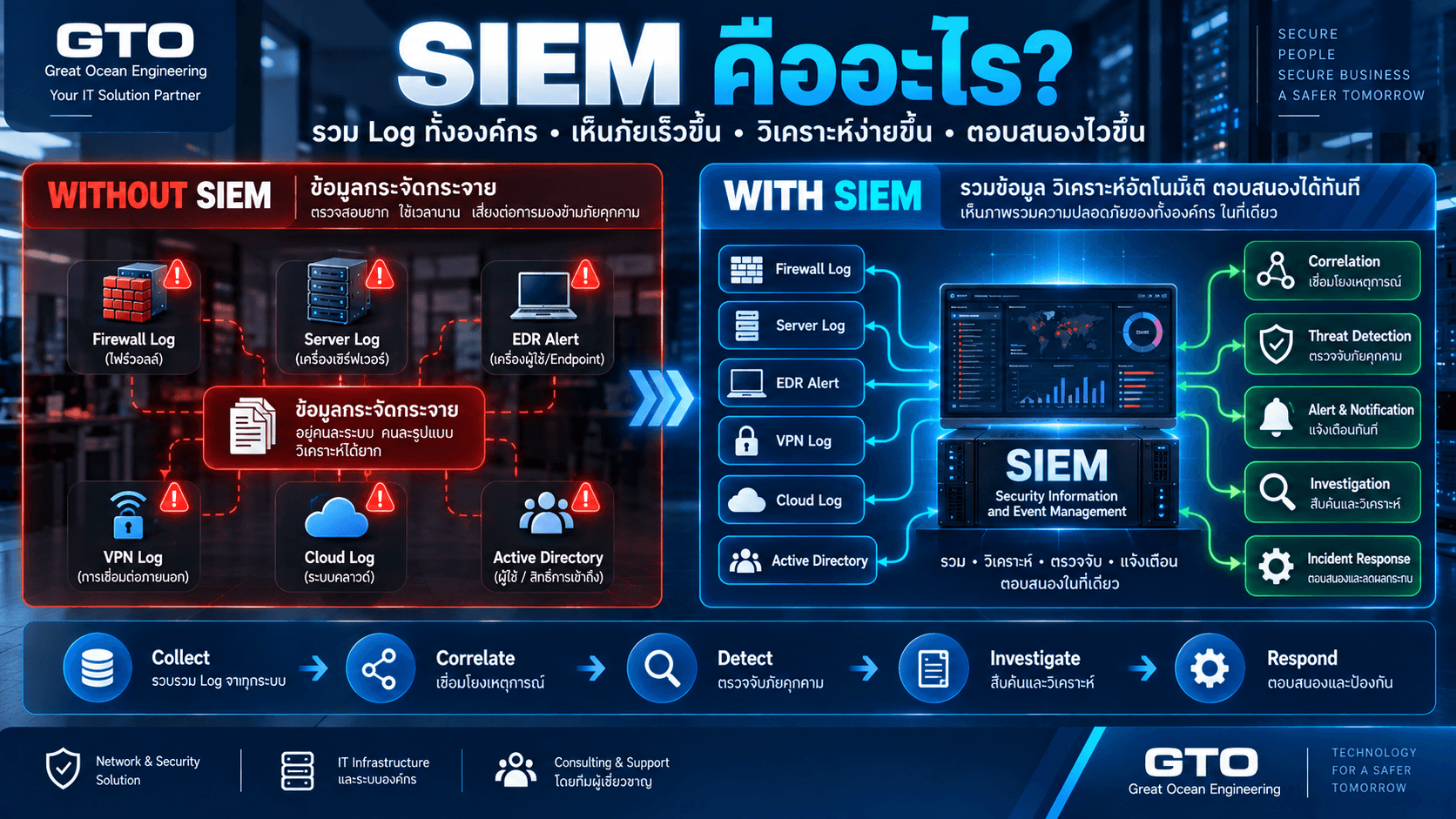
- SIEM
ควรรู้ก่อนว่า
เรากำลังปกป้องอะไร
เพราะถ้า Network Diagram ยังไม่มี
Asset ยังไม่ครบ
Data Flow ยังไม่รู้
Technology ใหม่อาจสร้าง Alert จำนวนมากแต่แก้ Risk หลักไม่ได้
เริ่มจาก Visibility ก่อน
แนวทางที่ดีคือ
See → Understand → Segment → Control → Monitor → Improve
หรือ
- เห็น Device
- เข้าใจ Traffic
- แบ่ง Zone
- ควบคุม Access
- Monitor
- ปรับปรุง
นี่ช่วยลดความเสี่ยงต่อ Production มากกว่าการ Block แบบทันที
SME โรงงานจำเป็นต้องทำ OT Security หรือไม่?
จำเป็นตามระดับ Risk
ไม่ต้องเริ่มจากระบบ Enterprise ราคาแพง
โรงงานขนาดเล็กสามารถเริ่มจาก
- แยก IT/OT
- Firewall
- VLAN
- Backup PLC
- Secure Remote Access
- Asset Inventory
- Disable Internet ที่ไม่จำเป็น
ก่อน
การทำ Basic Control ให้ถูกต้องให้ผลลัพธ์มากกว่าการซื้อ Technology ซับซ้อนแล้ว Configuration ไม่เหมาะสม
KPI ที่ควรติดตาม
Asset Visibility
รู้จัก OT Device กี่เปอร์เซ็นต์
Unauthorized Connection
มี Device ใหม่กี่ครั้ง
Remote Access
ใครเข้าระบบเมื่อไร
Backup Coverage
PLC/HMI มี Backup ล่าสุดหรือไม่
Firewall Rule Review
มี ANY ANY กี่ Rule
Vulnerability Exposure
Device Legacy อยู่ Zone ไหน
Mean Time to Detect
ตรวจ Incident ใช้เวลานานเท่าไร
OT Security Checklist สำหรับโรงงาน
ลองตอบคำถามต่อไปนี้
- IT กับ OT แยก Network หรือยัง?
- มี Industrial DMZ หรือไม่?
- Office PC เข้า PLC ได้ตรงหรือไม่?
- Vendor Remote ผ่าน MFA หรือไม่?
- PLC ออก Internet ได้หรือไม่?
- มี Inventory PLC/HMI ครบหรือไม่?
- PLC Program Backup ล่าสุดเมื่อไร?
- Shared Password ยังมีหรือไม่?
- Firewall Rule มี ANY ANY หรือไม่?
- มี Log Remote Access หรือไม่?
- Incident เกิดแล้วใครมีอำนาจ Disconnect Machine?
- OT กับ Production Team เคยซ้อม Incident ร่วมกันหรือไม่?
หากหลายข้อยังตอบไม่ได้
นี่คือจุดที่ควรเริ่ม OT Security Assessment
สรุป OT Security คืออะไร?
OT Security คือการปกป้องระบบที่ใช้ควบคุมกระบวนการทางกายภาพ เช่น PLC, SCADA, HMI และเครื่องจักร
ความแตกต่างสำคัญจาก IT Security คือ
OT ต้องรักษา
Cybersecurity + Availability + Reliability + Safety
พร้อมกัน
จึงไม่สามารถใช้แนวทาง
“ติด Antivirus แล้วจบ”
หรือ
“เจอปัญหาแล้ว Disconnect ทุกอย่าง”
ได้เสมอไป
แนวทางที่เหมาะสมควรเริ่มจาก
Asset Inventory
↓
Network Visibility
↓
IT/OT Segmentation
↓
Firewall / DMZ
↓
Secure Remote Access
↓
Backup
↓
Monitoring
↓
Incident Response
เป้าหมายสุดท้ายไม่ใช่เพียงป้องกัน Hacker
แต่คือ
ทำให้ Production สามารถทำงานต่อได้อย่างปลอดภัย แม้โลก IT และ OT จะเชื่อมต่อกันมากขึ้นเรื่อย ๆ
ต้องการประเมิน OT Security สำหรับโรงงาน?
Great Ocean Engineering ให้บริการออกแบบและปรับปรุงระบบ Network, Infrastructure และ Cybersecurity สำหรับสำนักงานและโรงงาน
ครอบคลุม
- IT/OT Network Segmentation
- Industrial Firewall
- VLAN
- Industrial DMZ
- Secure Remote Access
- VPN / MFA
- Network Monitoring
- Server / Virtualization
- Backup / Disaster Recovery
- Network Access Control
- Cybersecurity Assessment
ทีมงานสามารถช่วยตั้งแต่
OT Asset Survey → Network Diagram → IT/OT Segmentation → Firewall Policy → Remote Access → Backup → Monitoring
เพื่อให้ Security Architecture สอดคล้องกับระบบ Production จริง ไม่ใช่เพียงนำ Policy ฝั่ง IT ไปใช้กับเครื่องจักรโดยตรง
FAQ เกี่ยวกับ OT Security
OT Security คืออะไร?
OT Security คือการปกป้องระบบและอุปกรณ์ที่ใช้ควบคุมหรือ Monitor Physical Process เช่น PLC, SCADA, HMI และ Industrial Control Systems
IT Security กับ OT Security ต่างกันอย่างไร?
IT Security เน้นข้อมูลและ Application ขณะที่ OT Security ต้องคำนึงถึง Physical Process, Availability, Reliability และ Safety เพิ่มเติม
PLC ต้องมี Cybersecurity หรือไม่?
ต้อง เพราะ PLC สามารถเชื่อมกับ Engineering Workstation, HMI หรือ Network อื่น และหากถูกแก้ Logic หรือ Configuration อาจกระทบ Production โดยตรง
IT กับ OT ควรอยู่ Network เดียวกันหรือไม่?
โดยทั่วไปควรแยก Security Zone และควบคุม Communication ระหว่างกันผ่าน Firewall หรือ DMZ ตาม Requirement ที่จำเป็น
Industrial DMZ คืออะไร?
Industrial DMZ คือ Network กลางระหว่าง IT กับ OT สำหรับวาง Service ที่จำเป็นต้องแลกข้อมูลระหว่างสองฝั่ง โดยช่วยลดการเชื่อมต่อโดยตรงเข้า OT
Vendor Remote เข้า PLC อย่างไรให้ปลอดภัย?
ควรใช้ Controlled Remote Access เช่น VPN, MFA และ Jump Server พร้อม Logging และจำกัดสิทธิ์เฉพาะระบบที่ Vendor ต้องใช้งาน
OT Security ต้องใช้ Firewall พิเศษหรือไม่?
ขึ้นกับ Environment Industrial Firewall อาจมี Feature และ Hardware ที่เหมาะกับโรงงานมากกว่า แต่ Architecture และ Policy ที่ถูกต้องยังสำคัญกว่าการเลือก Product เพียงอย่างเดียว